Media resources
Use of Resources
The logos and visuals available on this page may be used to present or promote Ubikly, including in your articles, publications, presentations, or event materials.
Please do not modify, distort, or recolor the Ubikly logo, and use the version that offers the best readability for the given medium.
Please credit Ubikly as the source of any visuals or screenshots.
Ubikly Logo
Download our logo and icon in various versions, tailored to your communication materials.
Download all versions of the logo/icon
Ubikly-all-logo-versions.zip242 ko

Color Ubikly logo on a transparent background
logo-gradient-1.png91 ko

Black Ubikly logo on a transparent background
logo-black.png25 ko

White Ubikly logo on a transparent background
logo-white.png21 ko

Color Ubikly icon on a transparent background
picto-gradient.png96 ko

Black Ubikly icon on a transparent background
picto-black.png9 ko

White Ubikly icon on a transparent background
picto-white.png8 ko
Software Screenshots
Explore Ubikly’s interfaces through a selection of screenshots. These visuals can be used to showcase our software and illustrate its key features.
Download all screenshots
Ubikly-all-screenshots.zip1 Mo
User Interface
A selection of visuals to showcase the Ubikly user experience.
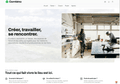
Ubikly user interface — home page
Ubikly-front-home.png2 Mo
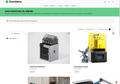
Ubikly user interface — machine list
Ubikly-front-machine_list.png605 ko
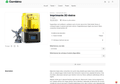
Ubikly user interface — machine detail sheet
Ubikly-front-machine_details.png376 ko
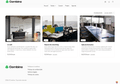
Ubikly user interface — space list
Ubikly-front-space_list.png969 ko
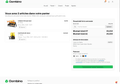
Ubikly user interface — shopping cart
Ubikly-front-cart.png225 ko
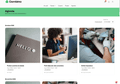
Ubikly user interface — event list
Ubikly-front-event_list.png1 Mo
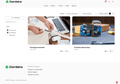
Ubikly user interface — list of projects
Ubikly-front-project_list.png930 ko
Administrator Interface
Screenshots to illustrate the management tools available to venue managers.
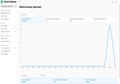
Ubikly admin interface — Administrator dashboard
Ubikly-admin-dashboard.png143 ko
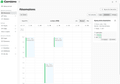
Ubikly admin interface — booking calendar
Ubikly-admin-calendar.png140 ko
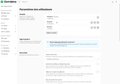
Ubikly admin interface — member management settings
Ubikly-admin-member_settings.png208 ko
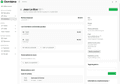
Ubikly admin interface — member detail sheet
Ubikly-admin-member_details.png188 ko
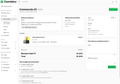
Ubikly admin interface — order details
Ubikly-admin-order_details.png238 ko
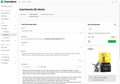
Ubikly admin interface — machine detail sheet
Ubikly-admin-machine_details.png325 ko
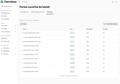
Ubikly admin interface — list of sessions for an event
Ubikly-admin-event_sessions.png162 ko
Have a question or need a specific visual?
